Cavatim Planning & everyday tools
Planning the week I can actually live.
Connecting long-term goals to the time that is actually available, across a planner, native apps and a private site.
Project statusLimited trial; new accounts and subscriptions currently closed
How it came about
I wanted a better connection between the things I say matter and what actually ends up in my diary. A list of goals is useful, but it does not tell me where the work is going to fit. A calendar gives me the hours, but it can lose the reason for using them.
Cavatim brings those two views together. It connects longer-term goals with monthly, weekly and daily action, and puts planned work alongside existing commitments. I have explored that across the web planner, native Apple apps and a private site. The point is the same in each: make a plan that survives contact with an ordinary week.
The difficult part
The difficult part is the relationship between the records. If a task already belongs to a goal, planning it should preserve that connection. Completing it should count in the right place. Creating a second, similar-looking task can make the screen look right while making the underlying system wrong.
There is also a difference between proposing a sensible plan and actually saving one. I have had to pay attention to what happens after a reload, when a week changes, or when two edits start from different versions. Those are less glamorous problems than a new dashboard, but they matter more when the planner holds real commitments.
What I built
I have been building Cavatim across a web planner, native apps and a private site. My part has been to work out how the goals, recurring tasks and actual week fit together, then build and test the routes between them. A task should retain its connection to the goal it came from, even when the plan changes.
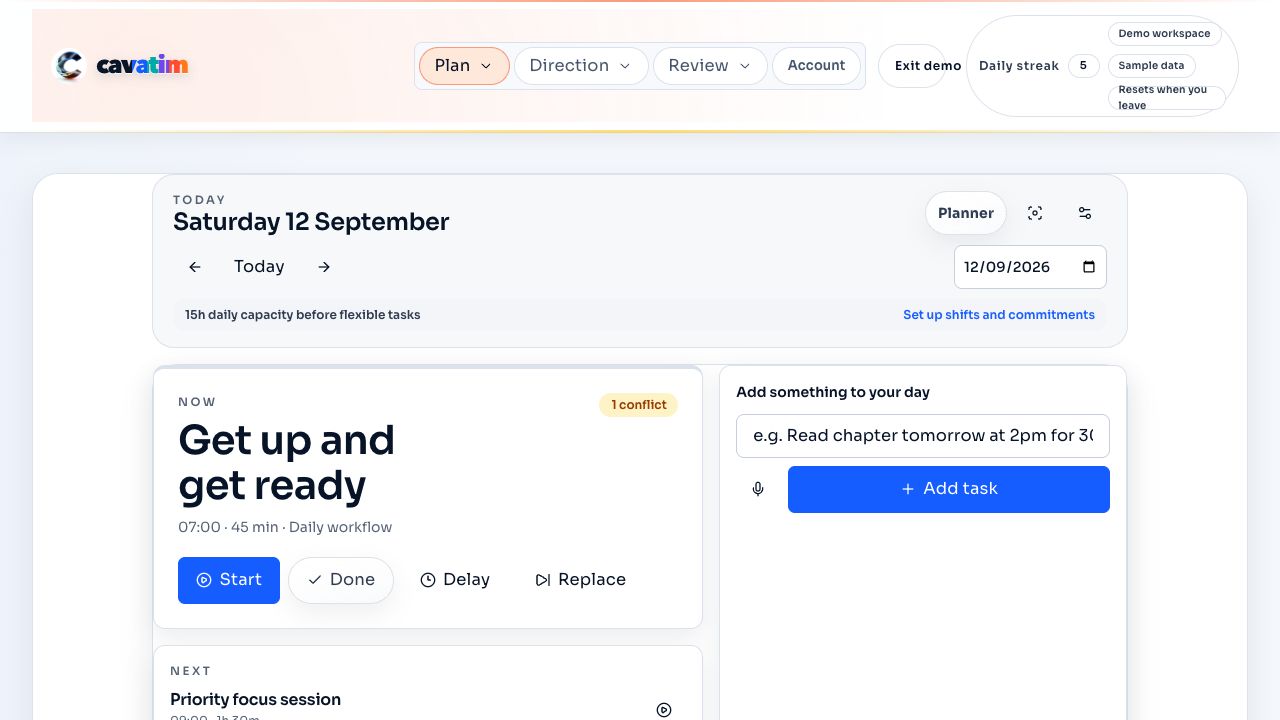
The public website includes a capacity calculator. I also use a planner demonstration with sample tasks, so the interface can be shown without exposing my own calendar. The screenshot here comes from that demonstration. It shows a working interface, rather than a drawing of something I intend to build.
A week with room to breathe
As a simple worked example, imagine a week with 40 hours available. Work, travel and fixed commitments take 24, leaving 16. Keeping four hours free leaves 12 to allocate. A two-hour piece of coursework and an hour of administration would leave nine. These are example figures, not a record of my week or a promise about what someone else can get done.
That is the decision I want the planner to make easier to see. If another commitment arrives, something has to move, shrink or wait. Putting more tasks on the screen does not create more time. I would rather have a plan I can return to after a change than a perfect-looking week that only works on paper.
What I checked
On 13 September 2026, two focused automated tests passed: the public capacity calculator changed its estimate when the available time and fixed work changed, and the demo planner produced stable task identities for the same reference date. The first checks the calculation shown to a visitor. The second helps keep the demonstration repeatable.
These checks cover those two behaviours. They do not prove that every planner route works, that calendars never conflict, or that Cavatim improves someone’s productivity. Those are wider questions that need their own testing and, for usefulness, evidence from people using it over time.
Where it stands
There is a public website and working planner software, alongside native development and a private site. Access is currently limited to the trial; new accounts and subscriptions are closed. I can show how the interface behaves and explain the decisions behind it. I am not presenting a measured improvement in users’ productivity or a customer success rate here.
The next useful evidence is whether people can make a workable week, adjust it when life intervenes and return without needing help. That is a more demanding test than whether the screen looks organised.
What I learnt
I have learnt to judge a planning tool by the amount of work it removes. If I have to keep explaining the same intention or repairing duplicated tasks, the tool is giving me another job.
The most useful design decision has been to keep the weekly context visible and allow work to be either timed or still waiting for a time. A plan should help me make choices about capacity. Filling every gap is not the same as making a good week.